MiroTalk SFU - WHIP Publish

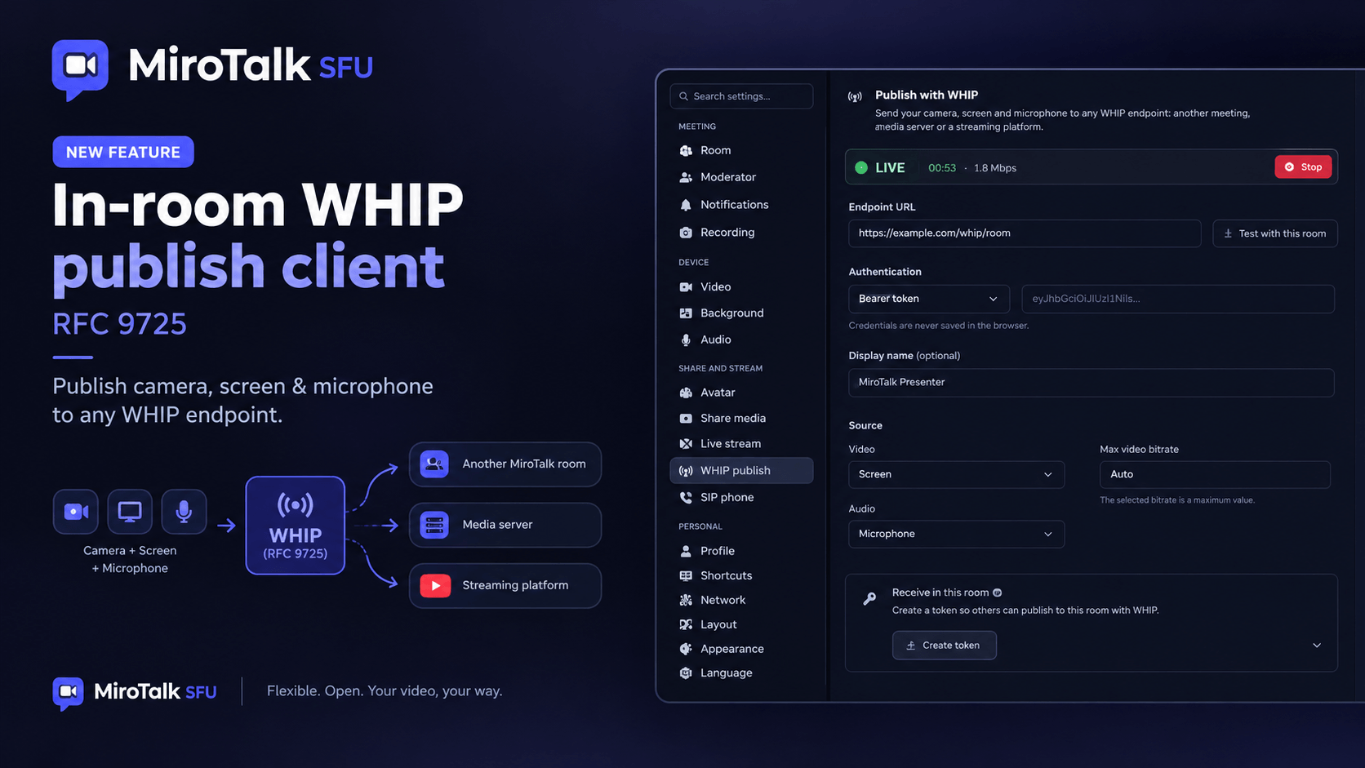
Presenters can publish their camera or screen and microphone from inside a MiroTalk SFU room to any WHIP endpoint (WebRTC-HTTP Ingestion Protocol, RFC 9725), straight from the browser: another MiroTalk room, a media server, or a streaming platform.
The stream runs on its own send-only WebRTC connection, separate from the meeting, so it has sub-second latency and needs no RTMP server, no FFmpeg, and no extra software.
Receiving a stream instead?
To publish OBS, FFmpeg, or GStreamer into a MiroTalk SFU room, see WHIP ingest.
Where can you publish?
| Destination | Example |
|---|---|
| Another MiroTalk room | https://other.domain/whip/room-name (see below) |
| Media server | MediaMTX, LiveKit, Janus, any server with a WHIP endpoint |
| Streaming platform | Cloudflare Stream, Dolby.io, and other WHIP-ready services |
Requirements
- You must be a presenter in the room. The tab is hidden for guests and in broadcasting mode.
- The WHIP publish tab is shown by default. Publishing to an external endpoint needs no server setup.
- Test with this room and Receive in this room need WHIP ingest enabled (
WHIP_ENABLED=true) on this server. - The endpoint must use
https://(http://works only forlocalhost) and allow your origin through CORS (POST,DELETE,Authorizationheader, exposedLocationheader).
Show or hide the tab
Add to your .env:
SHOW_WHIP_TAB=true # Show WHIP publish tab to presenters (true|false)
If your app/src/config.js was created from an older template, add tabWhipBtn to ui.buttons.settings:
settings: {
    // ...
    tabRTMPStreamingBtn: process.env.SHOW_RTMP_TAB !== 'false',
    tabWhipBtn: process.env.SHOW_WHIP_TAB !== 'false',
    // ...
},
Publish
- Open Settings → WHIP publish.
- Endpoint URL: paste the WHIP URL of the destination.
- Authentication: pick the method the endpoint expects and fill in the credentials (see Authentication).
- Display name (optional): the name shown at the destination.
- Source: choose the video, audio, and max video bitrate.
- Click Start publishing.
When the connection is up, the status bar shows LIVE, the duration, the current bitrate, and the destination host. Click Stop to end the stream.
Settings
| Field | Options | Notes |
|---|---|---|
| Endpoint URL | https://... |
For another MiroTalk SFU meeting: https://domain/whip/room-name |
| Authentication | None, Bearer token, Username and password | See Authentication |
| Display name | max 32 chars | See Display name |
| Video | Camera, Screen, No video | Camera reuses the camera already open in the room, so there is no permission prompt |
| Audio | Microphone, Screen audio, No audio | Screen audio is available only when Video is Screen |
| Max video bitrate | Auto, 1 Mbps, 2.5 Mbps, 4 Mbps | An upper limit: the browser can send less on a slow network |
Notes:
- With Screen, the browser asks which screen, window, or tab to share. If you do not share audio, only the video is published.
- At least one source is needed: No video + No audio is rejected.
- Stopping the screen share or unplugging the device ends the stream.
Authentication
| Method | Header sent | Use for |
|---|---|---|
| None | (no Authorization header) |
Open endpoints |
| Bearer token | Authorization: Bearer <token> |
MiroTalk SFU rooms and most WHIP services |
| Username and password | Authorization: Basic <base64(user:pass)> |
Servers with Basic auth (e.g. MediaMTX) |
- A URL like
https://user:pass@host/stream/whipis accepted too: the credentials are moved to the Username and Password fields, because browsers do not send them from the URL. - A token pasted with the
Bearerprefix is accepted. - Credentials are never saved in the browser. Only the endpoint URL (without credentials), the authentication method, the display name, the sources, and the bitrate are remembered for the next time.
Display name
- MiroTalk endpoints (
/whip/{room}):?name=is added automatically with your name in the room, or with Display name when you fill it in. - Other servers:
?name=is added only when you fill in Display name, since some servers sign the URL or reject unknown query parameters. - A
?name=already present in the endpoint URL is never changed. - When a MiroTalk per-room token was created with a name, that name takes precedence.
Publish into another MiroTalk room
In the destination room (WHIP ingest must be enabled on its server):
- A presenter opens Settings → WHIP publish → Receive in this room.
- Clicks Create token, then copies the Endpoint and the Token.
You can also create the token with the REST API.
In the source room:
- Open Settings → WHIP publish.
- Paste the Endpoint as Endpoint URL.
- Set Authentication to Bearer token and paste the Token.
- Click Start publishing.
The stream shows up in the destination room as a regular participant tile. The destination room must be active (at least one participant joined), and its server must allow your origin in CORS_ORIGIN when the two rooms are on different domains.
Test with this room
Test with this room creates a token for the current room and fills in the endpoint and the token, so you can check the setup without a second server. Mute the WHIP tile in the room to avoid hearing yourself.
Receive in this room
Create token gives presenters a per-room WHIP endpoint and token without the REST API key. Use them in OBS Studio, FFmpeg, GStreamer, or another meeting, exactly like a token from the API. The token expires after WHIP_TOKEN_EXPIRE (default 4h).
Stream lifecycle
| Event | Result |
|---|---|
| Stop | HTTP DELETE to the session URL (Location header), then media stops |
| Leave or close the page | HTTP DELETE is sent in the background |
| Presenter role removed | The stream stops |
| Media source ends (screen share closed) | The stream stops |
| Network interrupted | Connection interrupted, reconnecting... while WebRTC recovers |
| Connection failed | The stream stops with Connection failed |
The offer is sent with all ICE candidates gathered (no trickle ICE), so it works with ICE-lite servers such as MiroTalk SFU.
Troubleshooting
| Message | Fix |
|---|---|
| Cannot reach the endpoint (network or CORS error) | Check the URL and that the endpoint allows your origin (CORS). For MiroTalk, set CORS_ORIGIN |
| Browsers block http:// endpoints from an https:// page | Use an https:// endpoint |
| Unauthorized: check the credentials | Check the authentication method, token, or username and password, and that the token has not expired |
| Endpoint not found, the room must be active | Join the destination room from a browser first |
| This URL is not a WHIP endpoint | The URL answered 405: check the path (MiroTalk: /whip/{room}) |
| The endpoint does not support the browser codecs | The server must accept Opus audio and H.264, VP8, or VP9 video |
| The endpoint is busy, try again later | Session limit reached. MiroTalk: raise WHIP_MAX_SESSIONS / WHIP_MAX_SESSIONS_PER_ROOM |
| Too many requests, try again later | Rate limit hit. MiroTalk: wait a minute or raise WHIP_RATE_LIMIT_MAX |
| The endpoint did not answer in time | No answer within 15 s: check the server and the network |
| Test with this room / Receive in this room not visible | Enable WHIP ingest on this server (WHIP_ENABLED=true) and make sure you are a presenter |
| WHIP publish tab not visible | You must be a presenter, and SHOW_WHIP_TAB must not be false |
| You hear yourself | You are publishing into the same room: mute the WHIP tile |