MiroTalk SFU - Kubernetes (k3s)
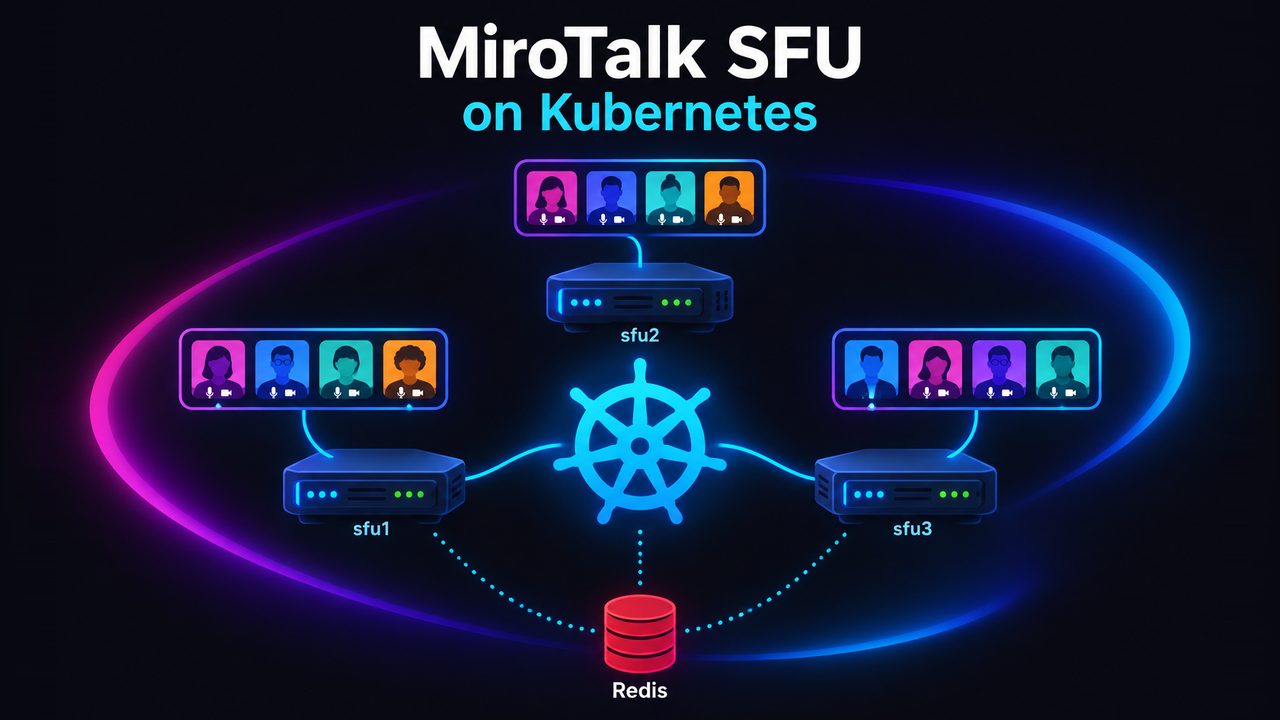
Overview
Run MiroTalk SFU on one or more bare-metal / VDS servers with k3s, using:
- the WebRTC server mode (
SFU_SERVER=true), so every server needs only a handful of media ports; - the built-in cluster mode (
SCALING_CLUSTER=true), so rooms are spread over the servers (see Scale SFU, Option 4).
All manifests live in the kubernetes/ folder of the MiroTalk SFU repository.
Only one server?
Kubernetes is optional. The Docker Compose setup with network_mode: host and SCALING_MULTI_WORKER_ROOMS=true gives the same performance with less to operate.
Architecture
                         DNS
  meet.example.com  ─►  A records of every SFU node   (shared entry point)
  sfu1.example.com  ─►  sfu1 public IP                 (one host per node)
  sfu2.example.com  ─►  sfu2 public IP

  ┌────────────────────── node sfu1 (VDS) ───────────────────────┐   ┌──── node sfu2 ────┐
  │  Traefik (DaemonSet, host ports 80/443, TLS)                 │   │  same as sfu1     │
  │      │ only to the pod on THIS node                          │   │                   │
  │      ▼                                                       │   │                   │
  │  mirotalksfu (DaemonSet, hostNetwork)                        │   │                   │
  │      :3010             http + websocket (internal only)      │   │                   │
  │      :40000-40004      WebRTC media udp+tcp (public)         │   │                   │
  └──────────────────────────────┬───────────────────────────────┘   └─────────┬─────────┘
                                 └──────────── Redis / Valkey (private) ───────┘
                                          room owners, node load, heartbeats
How it works
- One MiroTalk pod per server.
mirotalksfuis a DaemonSet on the host network, scheduled only on nodes labelledmirotalk/sfu=true. Media goes straight from the browser to the server public IP, no load balancer in the media path. - Few ports. With
SFU_SERVER=trueeach mediasoup worker opens one UDP and one TCP port fromSFU_MIN_PORT..SFU_MIN_PORT + SFU_NUM_WORKERS(4 workers ⇒40000-40004), instead of a 100+ port range. - Per-node settings without scripts. Kubernetes fills in the node values at start:
SFU_ANNOUNCED_IP=$(NODE_IP),SCALING_NODE_ID=$(NODE_NAME),SCALING_NODE_URL=https://$(NODE_NAME).$(NODE_DOMAIN). That is why the DNS host of a node must equal its Kubernetes node name (sfu1⇒sfu1.example.com). - Traffic stays on its node. Traefik runs on every node on ports 80/443. The
mirotalksfuService usesinternalTrafficPolicy: Local+ Traefiknativelb, so a request that enters nodesfu2is always served by the MiroTalk pod onsfu2. - Rooms are placed by the cluster. A user opens
https://meet.example.com/join/my-roomand lands on any node. That node asks Redis who ownsmy-room(or reserves it on the least loaded node) and either serves the page or redirects tohttps://sfuN.example.com/join/my-room. All peers of a room end up on the same node. - Safe restarts. The DaemonSet uses
updateStrategy: OnDelete: applying a new config never kills live meetings, you restart each node yourself when it is quiet. OnSIGTERMthe pod leaves the cluster first (new rooms go to the other nodes), tells clients to reconnect and closes its rooms.
More about cluster mode: Scale SFU, Option 4 and the upstream scaling README.
Files
| File | What |
|---|---|
production/kustomization.yaml |
Entry point (kubectl apply -k kubernetes/production). Cluster-wide settings (domain...) |
production/mirotalksfu.yaml |
MiroTalk DaemonSet (host network, per-node env) + node-local Service |
production/ingress.yaml |
Hosts and TLS. One host per node + the shared meet host |
production/redis.yaml |
Private Valkey (Redis) used by cluster mode |
production/namespace.yaml |
mirotalk namespace |
production/.env (you create it, git-ignored) |
Your regular MiroTalk .env, mounted read-only at /src/.env |
cluster/traefik-config.yaml |
Makes the k3s Traefik a DaemonSet on host ports 80/443 |
cluster/cluster-issuer.yaml |
Let's Encrypt issuer for cert-manager |
local/run.sh, local/kustomization.yaml |
Test locally: one-node k3s in Docker, production manifests + local overrides |
Test locally
Try the exact same manifests on your machine before renting servers: a one-node k3s cluster (node sfu1) runs inside Docker, with Traefik, Redis, cluster mode and the WebRTC server, like production.
Requirements: Docker (Docker Desktop on macOS/Windows) and kubectl. Free local ports 8443, 16443, 40000-40002.
./kubernetes/local/run.sh up # ~2 min the first time (downloads k3s + images)
Open https://meet.localhost:8443 in Chrome or Firefox (accept the self-signed certificate), join a room from two tabs or browsers and you should see and hear both.
./kubernetes/local/run.sh status   # pods + URLs
./kubernetes/local/run.sh logs     # follow MiroTalk logs
./kubernetes/local/run.sh down     # delete everything
export KUBECONFIG=$PWD/kubernetes/local/kubeconfig.yaml && kubectl -n mirotalk get pods   # use kubectl directly
What differs from production (local/kustomization.yaml): hosts are *.localhost:8443 with Traefik's self-signed certificate, the announced IP is 127.0.0.1 (Docker publishes the media ports there), 2 workers. If production/.env doesn't exist yet, run.sh creates it from .env.template with a random JWT_SECRET.
Note
Only one node runs locally: cluster redirects between nodes need real servers (or one DNS name per node).
Requirements
- 1+ Linux VDS / bare-metal servers with a public IPv4 on the network interface (no NAT), 4+ vCPU each.
- A domain where you can create A records.
kubectlon your machine (kustomize is built in).
Setup
1. DNS
For every SFU node sfuN with public IP IP_N:
| Record | Type | Value |
|---|---|---|
sfu1.example.com |
A | IP_1 |
sfu2.example.com |
A | IP_2 |
meet.example.com |
A | IP_1, IP_2 (all SFU) |
2. Hostnames
On every server, before installing k3s (the hostname becomes the node name):
hostnamectl set-hostname sfu1 # sfu2, sfu3, ...
3. Firewall (every node)
ufw default deny incoming
ufw default allow outgoing
ufw allow 22/tcp
ufw allow 80,443/tcp                       # Traefik (HTTP, HTTPS, Let's Encrypt)
ufw allow 40000:40004/udp                  # WebRTC media: SFU_MIN_PORT..SFU_MIN_PORT+SFU_NUM_WORKERS
ufw allow 40000:40004/tcp                  # WebRTC media over TCP (restrictive networks)
# k3s, only from the OTHER nodes (repeat per node IP)
ufw allow from <OTHER_NODE_IP> to any port 6443,10250 proto tcp
ufw allow from <OTHER_NODE_IP> to any port 51820 proto udp
# k3s pod and service networks
ufw allow from 10.42.0.0/16
ufw allow from 10.43.0.0/16
ufw enable
Warning
Do not open 3010 (MiroTalk, reached only through Traefik) or 6379 (Redis).
4. Install k3s
First node (sfu1), the control plane. wireguard-native encrypts the traffic between nodes over the internet:
mkdir -p /var/lib/rancher/k3s/server/manifests
cp kubernetes/cluster/traefik-config.yaml /var/lib/rancher/k3s/server/manifests/   # Traefik on every node
curl -sfL https://get.k3s.io | sh -s - server --flannel-backend=wireguard-native
cat /var/lib/rancher/k3s/server/node-token   # join token for the other nodes
cat /etc/rancher/k3s/k3s.yaml                # kubeconfig: copy it to your machine, replace 127.0.0.1 with IP_1
Other nodes:
curl -sfL https://get.k3s.io | K3S_URL=https://<IP_1>:6443 K3S_TOKEN=<node-token> sh -
Check: kubectl get nodes -o wide. The INTERNAL-IP column must show the public IPs (see Troubleshooting if not), and kubectl -n kube-system get ds traefik must show one Traefik pod per node.
5. TLS (cert-manager + Let's Encrypt)
kubectl apply -f https://github.com/cert-manager/cert-manager/releases/latest/download/cert-manager.yaml
kubectl -n cert-manager rollout status deploy/cert-manager-webhook
# set your email in cluster/cluster-issuer.yaml, then:
kubectl apply -f kubernetes/cluster/cluster-issuer.yaml
6. Configure MiroTalk
cd kubernetes/production
cp ../../.env.template .env
.env: your usual MiroTalk settings (see SFU configuration). It is shared by every node, so secrets are identical everywhere.JWT_SECRETis required (openssl rand -hex 32), the server won't start without it. Also setAPI_KEY_SECRET,HOST_*,OIDC_*, ... as you need.kustomization.yaml:NODE_DOMAIN,SERVER_HOST_URL,SFU_NUM_WORKERS(≤ vCPUs per node). These, and the per-node values inmirotalksfu.yaml, override the same keys in.env.ingress.yaml: your hosts, one per node +meet, in bothtls.hostsandrules.
7. Deploy
kubectl label node sfu1 sfu2 mirotalk/sfu=true
kubectl apply -k .
kubectl -n mirotalk get pods -o wide -w   # one mirotalksfu pod per node + redis, all Running 1/1
Note
kubectl rollout status does not work with OnDelete DaemonSets, watch the pods instead.
8. Verify
kubectl -n mirotalk logs -l app=mirotalksfu --tail=-1 | grep -E "Create a WebRtcServer|Cluster mode active"
kubectl -n mirotalk get certificate                     # READY True
curl -sI https://sfu1.example.com | head -1             # 200
curl -sI https://meet.example.com/join/test | head -3   # 200, or 302 to https://sfuN.example.com/join/test
Then join one room from two different networks (e.g. mobile data + home Wi-Fi) and check audio/video.
Operations
| Task | How |
|---|---|
| Add a node | Hostname, firewall, join k3s (steps 2-4), add DNS sfuN + add its IP to meet, add the host to ingress.yaml, kubectl apply -k kubernetes/production, kubectl label node sfuN mirotalk/sfu=true |
| Remove a node | Remove its IP from the meet DNS record, wait until it has no meetings, kubectl label node sfuN mirotalk/sfu- |
| Change config / update | Edit, kubectl apply -k kubernetes/production, then restart one node at a time when quiet: kubectl -n mirotalk delete pod -l app=mirotalksfu --field-selector spec.nodeName=sfu1. Pin image: to a version tag in production |
| More workers | Raise SFU_NUM_WORKERS and open the new port range in the firewall on every node |
| Recording | RECORDING_ENABLED=true in .env, uncomment the rec volume in mirotalksfu.yaml. Files stay on the node that hosted the room, in /var/lib/mirotalksfu/rec (must be writable by uid 1000: mkdir -p /var/lib/mirotalksfu/rec && chown 1000:1000 /var/lib/mirotalksfu/rec) |
Own config.js |
Copy app/src/config.template.js to kubernetes/production/config.js, uncomment the mirotalksfu-config generator in kustomization.yaml and the config volume in mirotalksfu.yaml |
| Logs | kubectl -n mirotalk logs -f -l app=mirotalksfu --max-log-requests=10 |
A stopping pod finishes within ~30 seconds (terminationGracePeriodSeconds: 45); its users get a "server restarting" notice and reconnect.
Troubleshooting
| Symptom | Fix |
|---|---|
Pod CrashLoopBackOff, log JWT_SECRET is not set |
Set JWT_SECRET in .env, kubectl apply -k kubernetes/production, delete the pods |
| No pod on a node | Node not labelled: kubectl label node sfuN mirotalk/sfu=true |
Pod CrashLoopBackOff, log EADDRINUSE |
Port 3010 / 40000+ already used on the host, e.g. an old Docker Compose MiroTalk still running |
| Page loads, but no audio/video | Media ports blocked (firewall / provider firewall, UDP and TCP), or wrong announced IP: kubectl -n mirotalk exec <pod> -- printenv SFU_ANNOUNCED_IP must be the public IP |
INTERNAL-IP is a private IP |
k3s picked a private interface. Reinstall with --node-ip=<public ip>, or delete the SFU_ANNOUNCED_IP entry in mirotalksfu.yaml so MiroTalk detects its public IP itself (NODE_ENV=production) |
| Redirect loops / room on the wrong server | DNS sfuN.example.com must point to node sfuN, and the node name must equal sfuN (kubectl get nodes) |
Traefik 404 page not found |
The host is missing in ingress.yaml |
Requests to one node hang, then 502/504 |
No MiroTalk pod on that node (traffic never leaves its node): meet DNS must list only SFU nodes, check the pod on that node |
Certificate not READY |
Port 80 open, all hosts resolve to the right nodes: kubectl describe certificate -n mirotalk mirotalksfu-tls |
Notes
- Redis holds only short-lived cluster state, so a single instance is enough. If it is down, every node keeps serving its own rooms. It is reachable only inside the cluster; add
--requirepassandredis://:pass@...if other workloads share the cluster. - Restrictive networks: MiroTalk SFU does not use TURN. Media uses UDP, with a fallback to TCP on the same ports (
40000-40004), so open both protocols. Networks that allow only port 443 can't reach the media ports. - CPU: the pod has no CPU limit on purpose (throttling causes media glitches). Don't run other heavy workloads on the SFU nodes.