MiroTalk SFU - WHIP Ingest

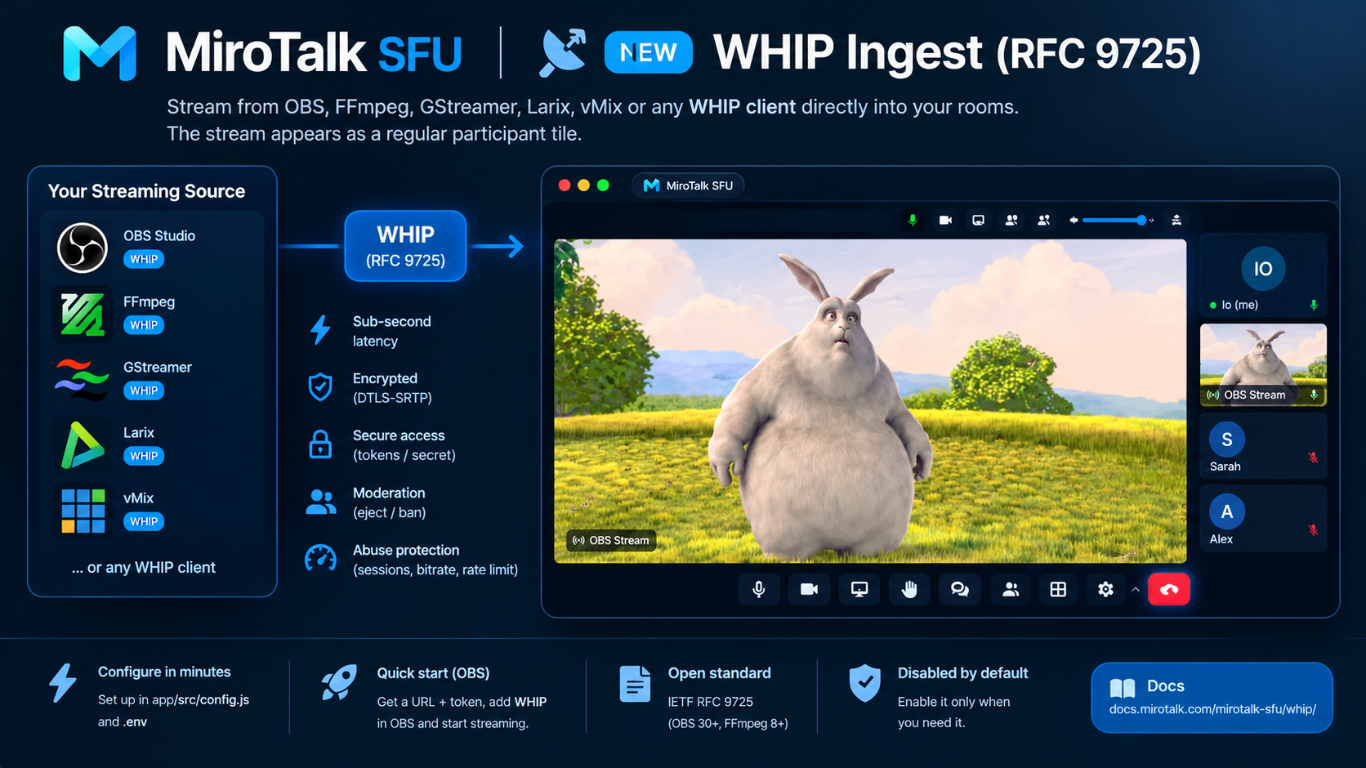
MiroTalk SFU supports WHIP (WebRTC-HTTP Ingestion Protocol, RFC 9725): publish audio and video from OBS Studio, FFmpeg, GStreamer, and other WHIP encoders straight into a meeting room.
The stream appears in the room as a regular participant tile. Everyone in the room sees and hears it with sub-second latency, with no RTMP server and no transcoding: the SFU only forwards the media.
Why WHIP?
| RTMP (classic) | WHIP | |
|---|---|---|
| ⚡ Latency | 2-10 s | < 1 s (WebRTC) |
| 🖥️ Server load | Transcoding / extra RTMP server | None, the SFU only forwards packets |
| 🔐 Transport | Plain TCP (or RTMPS) | DTLS-SRTP encrypted by default |
| 🌐 Network | TCP only | UDP with TCP fallback, NAT friendly |
| 🧩 Standard | Legacy, vendor specific extensions | IETF standard (RFC 9725) |
Compatible clients
| Client | How |
|---|---|
| OBS Studio 30+ | Settings → Stream → Service: WHIP |
| FFmpeg 8+ | -f whip muxer |
| GStreamer | whipclientsink (gst-plugins-rs) |
| Larix Broadcaster, vMix | WHIP output |
| Browser | Any WHIP JS library (e.g. @eyevinn/whip-web-client) |
1. Enable WHIP
Add to your .env:
WHIP_ENABLED=true
WHIP_API_SECRET=                    # optional, server-wide Bearer token (min 16 chars)
WHIP_TOKEN_EXPIRE=4h
WHIP_MAX_SESSIONS=5
WHIP_MAX_SESSIONS_PER_ROOM=1
WHIP_MAX_INCOMING_BITRATE=6000000
WHIP_RATE_LIMIT_MAX=30

API_ALLOW_WHIP=true
If your app/src/config.js was created from an older template, add the whip block inside media, and whip inside api.allowed:
media: {
    // ...
    whip: {
        enabled: process.env.WHIP_ENABLED === 'true',
        apiSecret: process.env.WHIP_API_SECRET || '',
        tokenExpire: process.env.WHIP_TOKEN_EXPIRE || '4h',
        maxSessions: parseInt(process.env.WHIP_MAX_SESSIONS) || 5,
        maxSessionsPerRoom: parseInt(process.env.WHIP_MAX_SESSIONS_PER_ROOM) || 1,
        maxIncomingBitrate: parseInt(process.env.WHIP_MAX_INCOMING_BITRATE) || 6000000,
        rateLimit: {
            windowMs: 60 * 1000,
            max: parseInt(process.env.WHIP_RATE_LIMIT_MAX) || 30,
        },
    },
},
api: {
    // ...
    allowed: {
        // ...
        whip: process.env.API_ALLOW_WHIP !== 'false',
    },
},
Restart MiroTalk SFU. The log shows WHIP ingestion enabled.
Settings
| Variable | Default | Description |
|---|---|---|
WHIP_ENABLED |
false |
Enable the /whip/{roomId} endpoint |
WHIP_API_SECRET |
(empty) | Server-wide Bearer token valid for every room (min 16 chars, else ignored) |
WHIP_TOKEN_EXPIRE |
4h |
Default lifetime of per-room tokens |
WHIP_MAX_SESSIONS |
5 |
Max simultaneous WHIP sessions on the server |
WHIP_MAX_SESSIONS_PER_ROOM |
1 |
Max simultaneous WHIP sessions per room |
WHIP_MAX_INCOMING_BITRATE |
6000000 |
Max bitrate accepted per session (bps) |
WHIP_RATE_LIMIT_MAX |
30 |
Max WHIP HTTP requests per IP per minute |
API_ALLOW_WHIP |
true |
Enable the POST /api/v1/whip token endpoint |
2. Get the WHIP URL and token
A Bearer token is always required. Use one of:
a) Per-room token (recommended)
Bound to one room, expires automatically, and can be banned individually.
curl https://your.domain/api/v1/whip \
    --header "authorization: YOUR_API_KEY_SECRET" \
    --header "Content-Type: application/json" \
    --data '{"room":"myroom","name":"OBS","expire":"4h"}' \
    --request POST
Response:
{
    "whip": "https://your.domain/whip/myroom",
    "token": "eyJhbGciOi..."
}
| Field | Required | Description |
|---|---|---|
room |
yes | Room to publish into |
name |
no | Display name of the WHIP participant (max 32 chars) |
expire |
no | Token lifetime (default WHIP_TOKEN_EXPIRE) |
Ready-made examples (JS, PHP, Python, Bash) are in app/api/whip/.
b) Server-wide secret
Use WHIP_API_SECRET as the Bearer token for any room. Simple, but it gives access to every room, so keep it private.
3. Publish
The room must be active: at least one participant has to be in it. WHIP never creates rooms.
OBS Studio (30+)
- Settings → Stream
- Service:
WHIP - Server:
https://your.domain/whip/myroom?name=OBS(the?name=sets the display name; a per-room token's name takes precedence) - Bearer Token: your token
- Settings → Output: video encoder
x264orNVENC H.264, audio encoder Opus. Recommended: keyframe interval1s, no B-frames. - Start Streaming
FFmpeg (8+)
ffmpeg -re -i input.mp4 \
    -c:v libx264 -profile:v baseline -preset veryfast -tune zerolatency -g 30 -bf 0 -pix_fmt yuv420p -b:v 2500k \
    -c:a libopus -ar 48000 -ac 2 -b:a 96k \
    -f whip -authorization "YOUR_TOKEN" "https://your.domain/whip/myroom?name=FFmpeg"
Test pattern without a file:
ffmpeg -re -f lavfi -i testsrc2=size=1280x720:rate=30 -f lavfi -i sine=frequency=440:sample_rate=48000 \
    -c:v libx264 -profile:v baseline -preset ultrafast -tune zerolatency -g 30 -bf 0 -pix_fmt yuv420p \
    -c:a libopus -ar 48000 -ac 2 \
    -f whip -authorization "YOUR_TOKEN" "https://your.domain/whip/myroom?name=Test"
GStreamer
gst-launch-1.0 videotestsrc ! videoconvert ! queue ! \
    whipclientsink name=ws signaller::whip-endpoint="https://your.domain/whip/myroom" \
    signaller::auth-token="YOUR_TOKEN" \
    audiotestsrc ! audioconvert ! queue ! ws.
4. Manage the stream in the room
| Action | Result |
|---|---|
| Stop streaming in the encoder | The client sends HTTP DELETE, the tile disappears |
| Presenter Eject | Session closed. The encoder can reconnect with the same token |
| Presenter Ban | Session closed and the token is rejected in that room (403 Banned from this room) |
| Last participant leaves | All WHIP sessions of the room end and the room closes |
| Network loss | Session closed after the ICE consent timeout |
Ban duration
- Per-room token: banned in that room until the token expires. Other tokens keep working.
- Server-wide secret: banned only in that room, until the room ends. Other rooms are unaffected.
Bans are kept in memory and cleared when the server restarts.
HTTP API reference
| Method | Path | Description |
|---|---|---|
POST |
/whip/{roomId}[?name=DisplayName] |
Body: SDP offer (application/sdp). Returns 201 + SDP answer |
DELETE |
/whip/{roomId}/{sessionId} |
Ends the session (URL from the Location header) |
PATCH |
/whip/{roomId}/{sessionId} |
405: trickle ICE / ICE restart not supported (ICE-lite server) |
POST |
/api/v1/whip |
Returns { whip, token } for a room (auth: API_KEY_SECRET) |
Every WHIP request needs Authorization: Bearer <token>.
Status codes
| Code | Meaning |
|---|---|
201 |
Session created (Location header = session URL) |
400 |
Invalid room name or SDP (only one audio and/or one video sendonly section, BUNDLE required) |
401 |
Missing or invalid Bearer token |
403 |
Room join-locked, full, or token banned in this room |
404 |
Room not found / not active, or unknown session |
405 |
Method not allowed |
406 |
No supported codec in the offer |
415 |
Content-Type is not application/sdp |
429 |
Rate limit exceeded |
503 |
Session limit reached (Retry-After header) |
Codecs
WHIP uses the room's router codecs:
- Audio: Opus
- Video: H.264 (Constrained Baseline / Main), VP8, VP9
H.264 streams labelled Baseline (e.g. FFmpeg/x264 profile-level-id=42001f) are accepted as Constrained Baseline.
Security notes
- 🔒 WHIP is disabled by default.
- 🔑 A Bearer token is always required. Per-room tokens are JWTs signed with a key derived from
JWT_SECRET. - 🚪 WHIP clients can only join active rooms; join-locked or full rooms reject them.
- 🛡️ Room password and lobby do not apply: the token is the authorization.
- 📉 Each session is capped by
WHIP_MAX_INCOMING_BITRATE, and session counts and requests are limited. - 🌐
/whip/*has its own CORS policy (CORS_ORIGIN, methodsPOST/DELETE/PATCH, exposesLocation) for browser-based clients. - 🖧 Make sure the WebRTC ports (
SFU_MIN_PORT-SFU_MAX_PORT, or the WebRTC server port) are reachable from the encoder, exactly as for browser participants.
Troubleshooting
| Problem | Fix |
|---|---|
404 Room not found or not active |
Join the room from a browser first |
401 Unauthorized |
Check the token, its room, and its expiry. WHIP_API_SECRET must be at least 16 chars |
406 No supported video codec |
Use H.264, VP8 or VP9 video and Opus audio |
503 Maximum number of WHIP sessions |
Raise WHIP_MAX_SESSIONS / WHIP_MAX_SESSIONS_PER_ROOM or stop another stream |
| Connects, but no video | Open the WebRTC UDP/TCP ports and set SFU_ANNOUNCED_IP to the public IP |
| OBS: no audio | Set the audio encoder to Opus |