MiroTalk SFU
Self-hosted WebRTC group meetings, classes, and webinars powered by mediasoup. An SFU forwards participant media through server infrastructure so rooms can grow beyond the practical limits of a peer-to-peer mesh.
Try the live demo Self-host MiroTalk SFU View product page
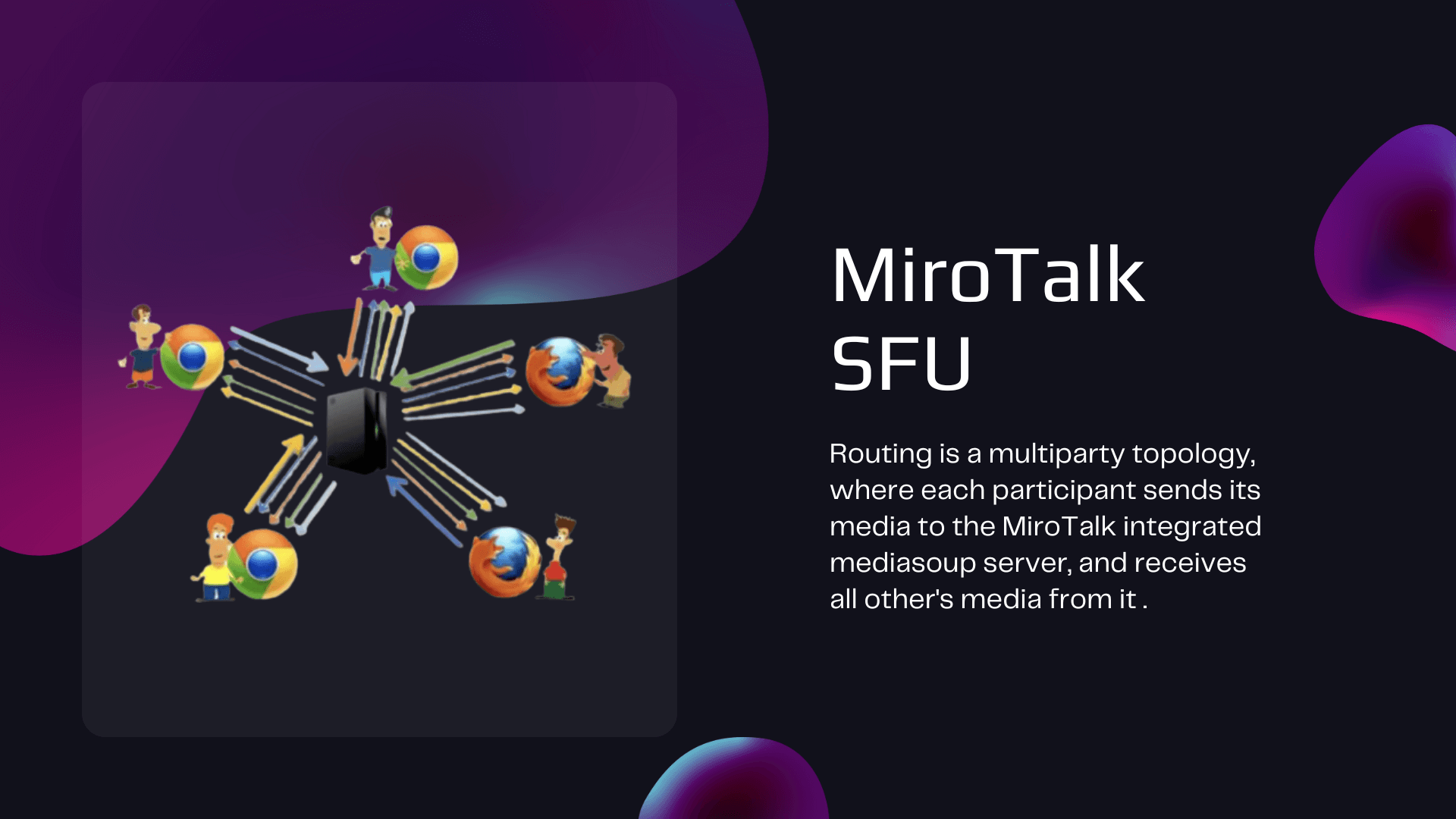
How MiroTalk SFU works
Each participant sends an upstream audio and video stream to the Selective Forwarding Unit. The server forwards selected streams to the other participants instead of mixing them into one composite feed.
| Responsibility | Participant device | SFU server |
|---|---|---|
| Upload | Sends one primary media stream | Receives participant streams |
| Distribution | Receives selected remote streams | Routes and forwards streams |
| Capacity pressure | Decoding, rendering, and access-network bandwidth | CPU, memory, network throughput, and media quality |
| Media trust boundary | DTLS-SRTP protects transport to the server | The self-hosted SFU is inside the media path |
This architecture reduces distribution work on participant devices, but server capacity becomes part of room planning. Validate expected room sizes, codecs, resolution, recording, and concurrent workloads in your own environment.
Compare MiroTalk architectures Plan SFU scaling
Meeting capabilities
Communication and collaboration
- Audio, webcam, and screen sharing
- Group and private chat
- File sharing and collaborative whiteboard
- Emoji, reactions, hand raising, and push-to-talk
- Collaborative editor and breakout rooms
Hosting and moderation
- Lobby and room locking
- Host protection and moderation controls
- Polls, webinar roles, and presenter controls
- Direct room links with configurable join options
- Multiple rooms without a fixed meeting duration imposed by the application
Media and extensions
- Local and server-side recording options
- RTMP streaming and broadcasting workflows
- Virtual backgrounds and noise suppression
- Speech recognition, AI assistants, and avatar integrations where configured
- Responsive browser interface without a required client download or plugin
Capabilities can require additional services or configuration. Use the linked guides as the source of truth for prerequisites and current behavior.
Build with SFU
| Goal | Documentation | What it covers |
|---|---|---|
| Create and inspect meetings programmatically | REST API | Meeting creation, active meetings, statistics, and room lifecycle operations |
| Embed a meeting experience | Iframe and widget integration | Iframe API, configuration options, and widget setup |
| Construct direct meeting links | Room join options | Query parameters and room-entry behavior |
| React to meeting events | Webhooks | Configuration and meeting lifecycle events |
| Add in-room SIP calling (experimental) | SIP phone | Kamailio demo stack, SIP UI fields, WSS compatibility, and troubleshooting |
| Stream to RTMP services | RTMP streaming | FFmpeg, Node Media Server, and Nginx RTMP options |
| Publish OBS, FFmpeg, or GStreamer into a room | WHIP ingest | Sub-second WebRTC ingest (RFC 9725), tokens, encoder setup, and troubleshooting |
| Publish from a room to any WHIP endpoint | WHIP publish | In-room WHIP client: camera, screen, and microphone to another room, a media server, or a streaming platform |
| Enable remote control | RustDesk remote control | Self-hosted RustDesk server, client setup, and SFU .env options |
Self-host and operate
| Stage | Start here | Outcome |
|---|---|---|
| Install | Self-hosting guide | Deploy with Node.js, PM2, or Docker behind HTTPS |
| Configure | Configuration reference | Set server and client behavior |
| Protect hosts | Host protection | Restrict host capabilities and room creation |
| Scale | Scalability guide | Plan vertical or multi-server deployment |
| Update | Update guide | Maintain a customized installation |
| Develop locally | Ngrok guide | Expose a development instance over HTTPS |
Capacity figures require testing
Participant capacity is workload-dependent. Browser mix, active cameras, selected video quality, frame rate, recording, AI features, RTMP output, TURN traffic, and concurrent rooms can materially change resource use.
Security model
- WebRTC media transport between each participant and the SFU is protected with DTLS-SRTP.
- The SFU must process routing information and is inside the media trust boundary; deploy it on infrastructure you control and secure.
- OIDC, host protection, and JWT-based API controls are available for their documented workflows.
- Production deployments require HTTPS, restricted administration, maintained dependencies, and appropriate firewall rules.
Configure host protection Review deployment requirements
Use managed or commercial options
Use MiroTalk Cloud when you want a managed service instead of operating SFU infrastructure. For private or commercial licensing requirements, use the official licensing page as the source of truth.
Start MiroTalk Cloud Compare licensing options View SFU commercial options
Need deployment assistance, customization, or dedicated infrastructure? Contact MiroTalk Enterprise.