MiroTalk SFU - RTCStats
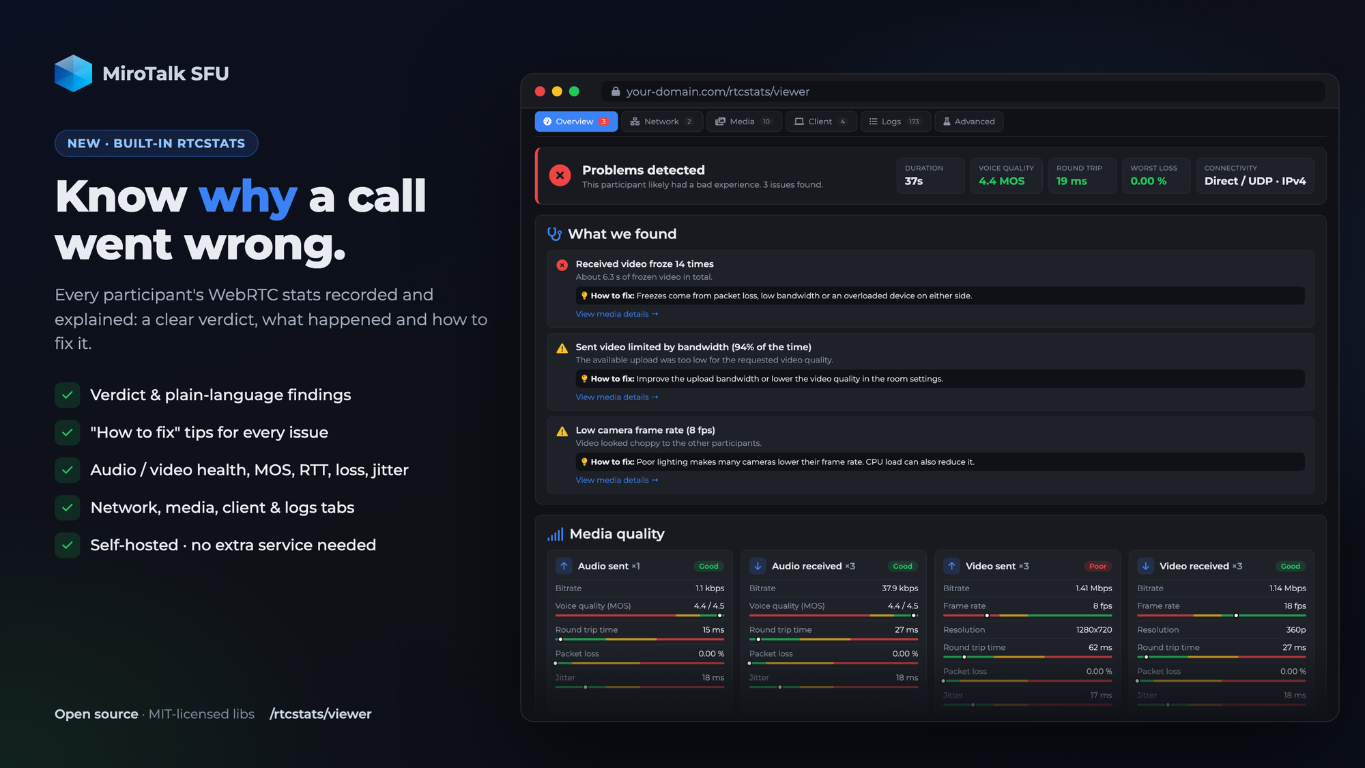
Optional WebRTC observability powered by rtcstats.
When enabled, every participant streams a dump of all RTCPeerConnection / getUserMedia API calls, events and periodic getStats() (like chrome://webrtc-internals) to a collector. When a user reports frozen video or choppy audio, you can inspect what happened on the call (packet loss, jitter, bandwidth, ICE failures, frame drops...) without asking them to reproduce it.
It is disabled by default and costs nothing when off: the browser library (public/sfu/RtcStats.js, built by npm run build:rtcstats) is only loaded when enabled.
Built-in collector (default)
No extra service needed, MiroTalk receives the dumps on wss://<your-host>/rtcstats and writes them to app/rtcstats/.
# .env
RTCSTATS_ENABLED=true
- One file per participant connection:
<start-time>_<room>_<id>.rtcstats.txt(RTCStatsDump file format v3). Each (re)join starts a new dump. - The connection is authorized with a short-lived, single-use token issued to joined participants only (not lobby).
- Non-relay IP addresses in candidates, SDP and stats are masked (
192.168.1.x) and device labels are stripped by default. RTCSTATS_RETENTION_DAYS(default7) deletes old dumps,RTCSTATS_MAX_DUMP_SIZE_MB(default50) caps a single dump.- Docker: mount
./app/rtcstats:/src/app/rtcstatsto keep the dumps (seedocker-compose.template.yml).
The dump metadata (2nd line) contains rtcStats.conference (room), rtcStats.session (participant socket), rtcStats.user (peer uuid), roomSessionId (room instance) and the tags (role:presenter / role:guest + RTCSTATS_TAGS).
External rtcstats-server
For a dedicated, horizontally scalable collector with S3 storage, Postgres metadata or automatic upload to rtcstats.com, run the upstream rtcstats-server with docker-compose-rtcstats.yml:
RTCSTATS_JWT_SECRET=$(openssl rand -hex 32) npm run rtcstats:up # docker-compose-rtcstats.yml
rtcstats-server does not terminate TLS, put it behind your reverse proxy, then:
# .env
RTCSTATS_ENABLED=true
RTCSTATS_URL=wss://rtcstats.your-domain.com
RTCSTATS_JWT_SECRET=<same value as the rtcstats-server>
One dump folder for both collectors
The compose file writes rtcstats-server's finished dumps to ./app/rtcstats, the same folder as the built-in collector (RTCSTATS_DIR). So the viewer lists, analyzes and deletes them, and RTCSTATS_RETENTION_DAYS applies, whichever collector is used. A small init step gives the folder to the node user (uid 1000) used by both images. If MiroTalk runs in Docker, mount the same folder there too (./app/rtcstats:/src/app/rtcstats). rtcstats-server names its dumps by uuid: they are listed with their room, participant and role because the browser records a :mirotalk identity event into every dump.
Dumps collected by an older setup (named volume) can be copied into the shared folder with:
docker run --rm -v mirotalksfu_rtcstats_data:/old -v "$PWD/app/rtcstats":/new busybox sh -c 'cp -a /old/upload/. /new/'
Analyzing dumps
MiroTalk ships its own viewer at https://<your-host>/rtcstats/viewer:
- Server dumps (built-in collector): enter the REST API key (
API_KEY_SECRET) to list, filter, analyze, download and delete the dumps inapp/rtcstats/, or remove them all with Delete all (top right, confirmed by typingDELETE; dumps still recording are kept). The list refreshes itself every 10 seconds while visible (Auto-refresh switch, top right) and with the Refresh button. The key is kept in the tab's session storage only. The defaultmirotalksfu_default_secretis refused: set a strongAPI_KEY_SECRETfirst. - Open file / drag and drop: any RTCStats or
chrome://webrtc-internalsdump, read locally in your browser (no API key needed). Use it for external rtcstats-server dumps (named by uuid without extension,docker cp mirotalkrtcstats:/home/node/upload ./dumps).
Each dump opens in an analysis page with tabs:
| Tab | What it answers |
|---|---|
| Overview | Was the call good? A verdict (good / some issues / problems), What we found (each finding explains the impact and how to fix it), health cards for audio/video sent and received (bitrate, estimated voice MOS, frame rate, resolution, RTT, packet loss, jitter) and a summary. |
| Network | Each media connection: direct or TURN relay, UDP/TCP, candidates, connection/ICE state timeline, round trip time and available bandwidth charts. |
| Media | Every sent/received stream (incl. simulcast layers) with codec, resolution, frame rate, bitrate, loss, jitter, status and charts. |
| Client | Browser, OS, hardware, devices and every camera/microphone/screen request with its result or error. |
| Logs | All WebRTC calls and events (incl. SDP) with search, per-connection filter and a Problems only switch. |
| Advanced | Stats explorer to plot any raw getStats() property (value or per-second rate) and the RTCPeerConnection configuration. |
Detected problems include camera/microphone errors (permission denied, device busy...), failed or interrupted connections, TCP or TURN fallback, packet loss, high latency or jitter, choppy audio, video freezes, video limited by CPU or bandwidth, low frame rate, CPU pressure and page reloads.
| Metric | Good | Poor |
|---|---|---|
| Packet loss | below 1% | above 5% |
| RTT | below 150 ms | above 300 ms |
| Jitter | below 30 ms | above 50 ms |
| Voice MOS | from 4.0 | below 3.5 |
The rules live in public/js/RtcStatsAnalyzer.js.
The viewer uses the MIT licensed rtcstats-shared parser and uPlot charts, so no commercial charting license is needed.
Other options:
- rtcstats.com: upload a dump for observations, an experience score and an AI summary (third-party service).
- Upstream dump-importer: rtcstats.github.io/rtcstats/dump-importer (uses Highcharts, free for non-commercial use only).
Settings
| Variable | Default | Description |
|---|---|---|
RTCSTATS_ENABLED |
false |
Enable RTCStats |
RTCSTATS_URL |
External rtcstats-server wss:// URL (empty = built-in) |
|
RTCSTATS_JWT_SECRET |
External only: rtcstats-server authorization.jwtSecret |
|
RTCSTATS_GET_STATS_INTERVAL |
1000 |
getStats() polling interval in ms |
RTCSTATS_EXCLUDE_DEVICE_LABELS |
true |
Strip camera/microphone labels |
RTCSTATS_TAGS |
Extra comma-separated tags, e.g. env:prod ([a-zA-Z0-9_.:-]) |
|
RTCSTATS_DIR |
../rtcstats |
Dump directory (relative to app/src), shared with the external rtcstats-server |
RTCSTATS_MAX_DUMP_SIZE_MB |
50 |
Built-in: max size of a single dump |
RTCSTATS_RETENTION_DAYS |
7 |
Delete dumps older than N days (0 = keep), both collectors |
RTCSTATS_OBFUSCATE_IP_ADDRESSES |
true |
Built-in: mask non-relay IP addresses |
See the SFU configuration guide for the rest of the .env options.
Privacy
Dumps describe the participants' devices, network and call quality. Inform your users accordingly and keep the retention short.